

Approving companies
When auto-approve is off, company profiles that employers create wait in the approval queue until you approve them. Use it to check that a company is genuine before it appears on your board.
Open the approval queue
Section titled “Open the approval queue”Go to WP Job Portal → Companies → Approval Queue. The page is titled Companies Approval Queue.
To narrow the list, use Company Name, Date Start and Date End, then select Search.
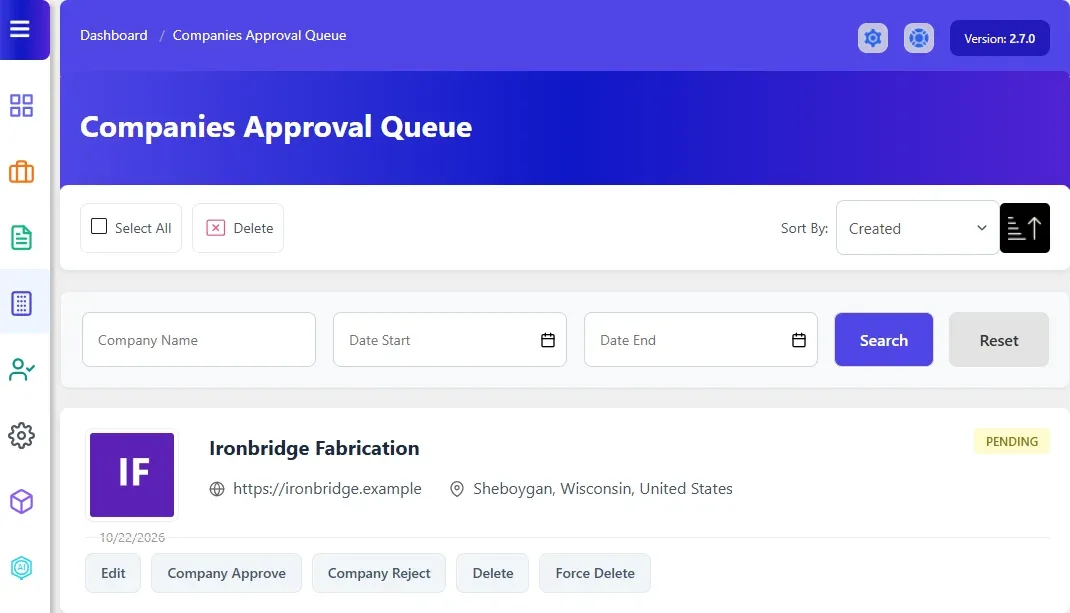
Approve or reject a company
Section titled “Approve or reject a company”- To check the profile first, select the company name or Edit.
- In the queue, select Company Approve or Company Reject on the company’s row.
| Action | What happens |
|---|---|
| Company Approve | The company becomes Approved and moves to the companies list. The employer gets the Company Status email |
| Company Reject | The company becomes Rejected and moves to the companies list. The employer gets the Company Status email |
To approve a company you rejected, edit it in Companies and set Status to Approved.
The emails are set up in Email Templates → Company Status. See Email templates.
Delete companies from the queue
Section titled “Delete companies from the queue”Each row also has Delete and Force Delete. Delete refuses if the company has jobs; Force Delete removes the company with its jobs and their applications. See Managing companies.
Turn auto-approve on or off
Section titled “Turn auto-approve on or off”- Go to WP Job Portal → Configuration and open the Companies tab.
- Under Company Settings, set Company Auto Approve.
- Select Save Changes.
With Company Auto Approve on, new companies are approved as soon as they’re saved and never reach the queue. Companies you add yourself in wp-admin use the Status you pick on the form.