

The employer dashboard
The employer dashboard is your home on the job board. From it you reach every employer screen: your jobs, your company, the people who applied and, on some job boards, resume search, messages and billing.
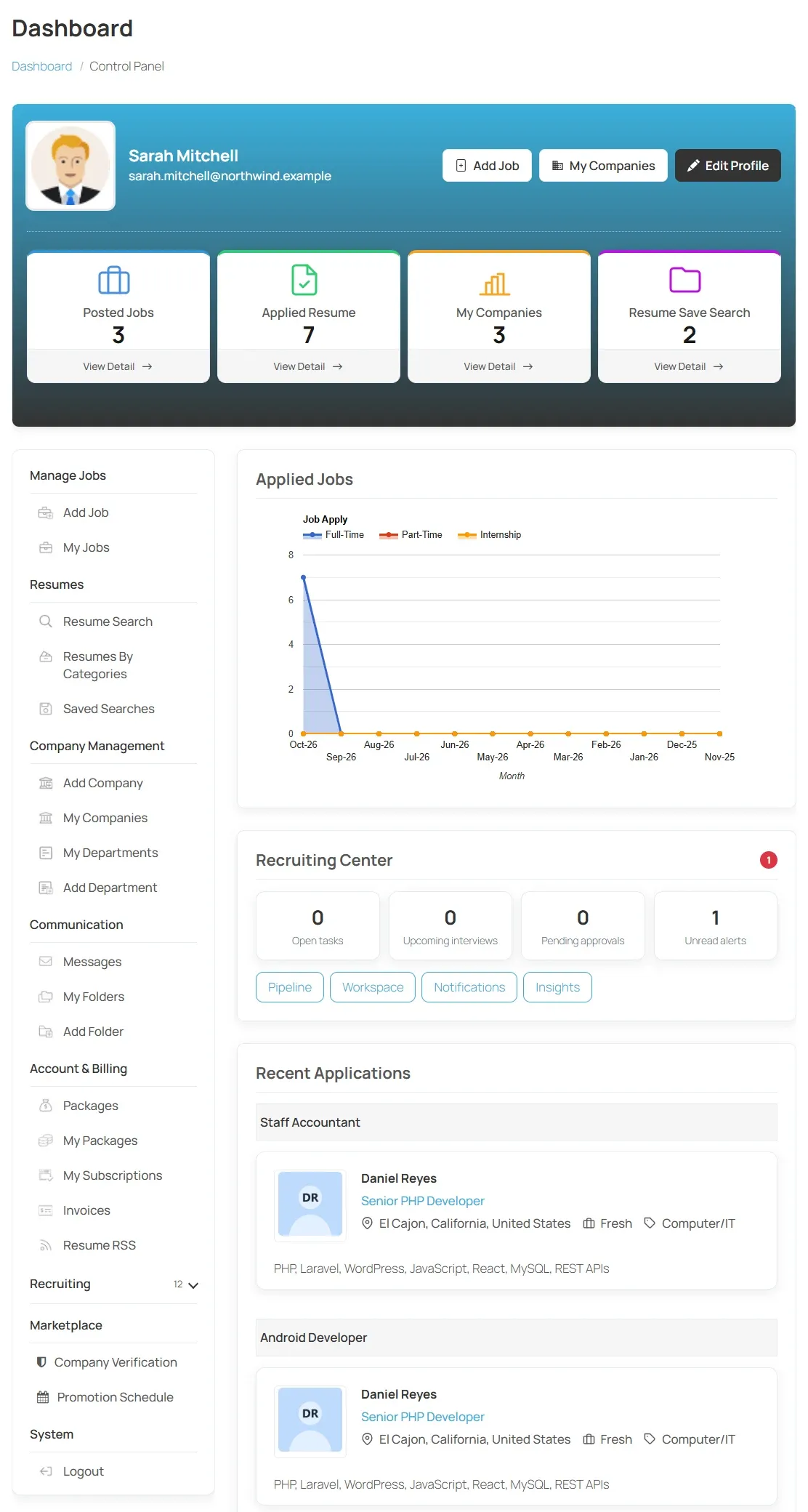
The job board decides which parts of the dashboard you see, so yours may show fewer sections than described here.
Your profile
Section titled “Your profile”The top of the dashboard shows your company logo and name, with three buttons:
| Button | What it opens |
|---|---|
| Add Job | The job form. See Posting a job. |
| My Companies | Your company or companies. See Adding a company. |
| Edit Profile | Your own account details. |
Stat boxes
Section titled “Stat boxes”Each box shows a count and a View Detail link.
| Box | What it counts | View Detail opens |
|---|---|---|
| Posted Jobs | Your approved jobs. | My Jobs |
| Applied Resume | Applications to your jobs. | My Jobs, where each job shows its applicants. |
| My Companies | Your companies. | My Companies |
| Resume Save Search | Your saved resume searches. Shown only where resume search is offered. | Your saved searches. |
Short Links
Section titled “Short Links”The Short Links menu lists every employer screen, grouped into sections:
| Section | Links |
|---|---|
| Manage Jobs | Add Job, My Jobs |
| Resumes | Resumes By Categories, and where offered, Resume Search and Saved Searches |
| Company Management | Add Company (or Edit Company once you have one), My Companies, and where offered, Add Department and My Departments |
| Communication | Where offered: Messages, My Folders and Add Folder |
| Account & Billing | Where offered: Packages, My Packages, My Subscriptions, Invoices and Resume RSS |
| System | Login and Register when you are signed out, Logout when you are signed in |
Some job boards add a Recruiting section with a Recruiting Center link, or a Marketplace section with Company Verification and Promotion Schedule.
Applications overview
Section titled “Applications overview”The main area of the dashboard shows:
- Applied Jobs: a chart of applications to your jobs. It appears once you have applications.
- Recent Applications: the latest people to apply, grouped by job, each with a View Resume button.
- Suggested Resumes: resumes that match your jobs, on job boards that offer suggestions.
- Your invoices, on job boards that sell packages.
On job boards with a recruiting workspace, a Recruiting Center box above Recent Applications shows your Open tasks, Upcoming interviews, Pending approvals and unread updates.
If you are not signed in
Section titled “If you are not signed in”Visitors see a Welcome, Visitor! banner with Login and Register buttons. See Registering as an employer.