

Ways to charge
The Submission Type setting decides whether users pay to post, and how. Free works on any site. Per Listing and Membership need Marketplace Suite; until it is active those settings show Unlock with Credits.
Choose a submission type
Section titled “Choose a submission type”- Open WP Job Portal → Configurations → Monetization.
- In General Monetization, set Submission Type to Free, Per Listing or Membership.
- Select Save.
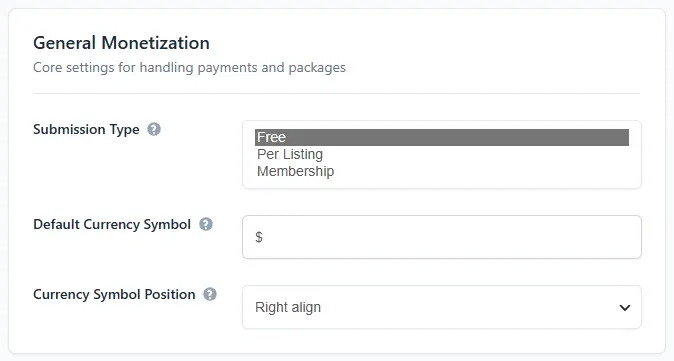
In Careers & ATS mode this setting is locked to Free, because you are the only one posting jobs.
| Submission type | How users pay | Best for |
|---|---|---|
| Free | Nobody pays. | A new board building up listings, or a board you fund another way. |
| Per Listing | A one-off price each time someone does a priced action, such as posting a job. | Occasional posters who don’t want a commitment. |
| Membership | Users buy a package that allows a set number of actions, once or as a subscription. | Regular posters and recruitment agencies. |
Jobs, companies and resumes are saved and follow your normal approval settings. With Marketplace Suite active you can still feature listings for free. The featured period comes from the Days Until Featured … Expires Free fields in Per Listing Prices.
Per Listing
Section titled “Per Listing”Each action has its own price in the Per Listing Prices group on the Monetization tab.
| Option | What it charges for |
|---|---|
| Price per Company Submission | Adding a company |
| Price per Featured Company | Featuring a company |
| Price per Job Submission | Posting a job |
| Price per Featured Job | Featuring a job |
| Price per Resume Submission | Adding a resume |
| Price per Featured Resume | Featuring a resume |
| Price per Job Apply | A job seeker applying for a job |
| Price to View Resume Contact | An employer seeing a resume’s contact details |
| Price to View Company Contact | A job seeker seeing a company’s contact details |
| Price per Department Submission | Adding a department |
| Price per Cover Letter Submission | Adding a cover letter |
| Price per Job Alert Submission | Creating a job alert |
The same group sets how long a paid featured listing lasts: Days Until Featured Company Expires Per Listing, Days Until Featured Job Expires Per Listing and Days Until Featured Resume Expires Per Listing. Job Expiry Days Per Listing is on the Jobs tab.
When a user saves something that has a price, it is kept back until they pay. A new job, for example, waits for payment and the employer sees Make Payment next to it in My Jobs. After payment the job follows your job auto-approve setting. If an action has no price, it goes through free.
Which currency per-listing prices use
Section titled “Which currency per-listing prices use”The Monetization tab has no currency field for per-listing prices. Stripe and PayPal charge them in the currency with ID 1 in WP Job Portal → Currency, which is US Dollar on a new site. Your default currency is not used, and reordering the list does not change it. Check that currency’s Code before you take real per-listing payments.
Membership
Section titled “Membership”Users buy a package and each action draws on it. Posting a job uses one job from the package, featuring it uses one featured job, and so on. When a user has more than one package with room left, they choose which one to use.
If you have not published any package for a user’s role, Membership lets that user act without one. Publish at least one package for employers, and one for job seekers if you want to charge them, before you switch to Membership.
See How credits work for how package balances are counted.
Changing the submission type later
Section titled “Changing the submission type later”Switching type does not delete jobs, packages or invoices. Packages users already bought keep their remaining balances, but they are only drawn on while the type is Membership.