

AI writer
The AI writer drafts the text of a long field for you: a job description, a company description, the skills on a resume or a cover letter. It reads what is already filled in on the form, writes a draft in the editor, and you check it before you save.
It needs AI to be set up on the site. See AI settings.
Where it appears
Section titled “Where it appears”| Form | Field | Who | Button |
|---|---|---|---|
| Job form (wp-admin and the employer’s Add Job) | Description | Employers and administrators | Generate Description |
| Company form (wp-admin and the employer’s Add Company) | Description | Employers and administrators | Generate Profile |
| Resume form, with Pro | Skills | Job seekers and administrators | Generate Skills |
| Cover letter form and the apply form, with Pro | Cover letter | Job seekers and administrators | Generate Cover Letter |
On the site, employers and job seekers see it only when its task is on under WP Job Portal → AI → Settings → Features and they are signed in. Administrators always see it while AI is on.
Write a draft
Section titled “Write a draft”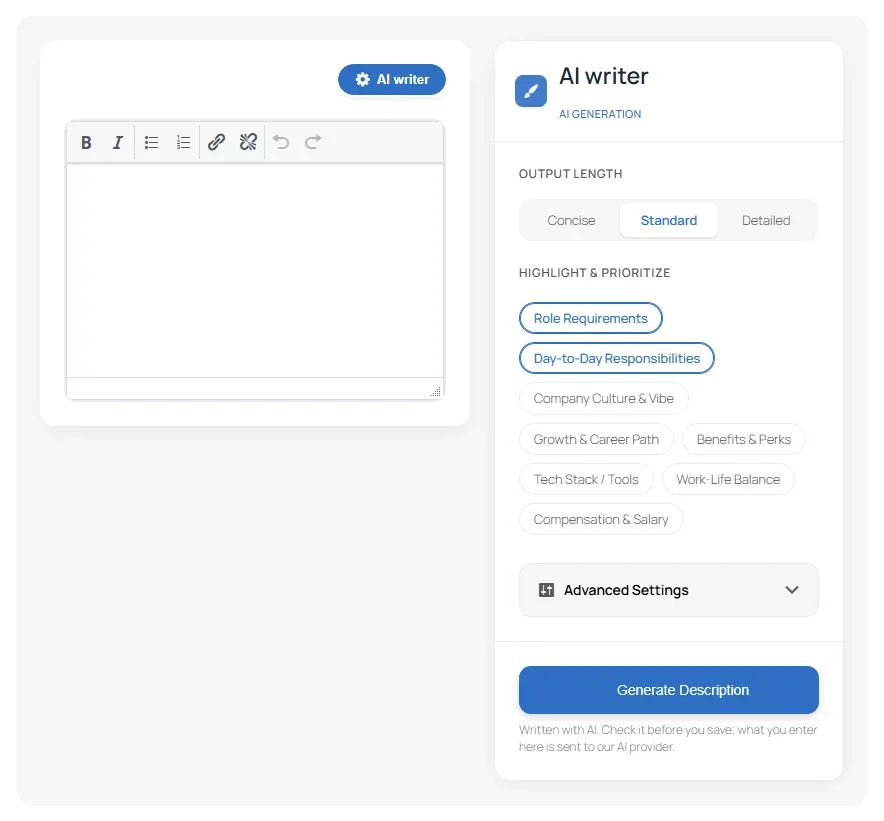
- Fill in the rest of the form first. For a job, enter at least the job title or some of the description; the writer uses what is on the form.
- Above the editor, select AI writer. The panel opens. Select it again to close it.
- Choose the options you want (see below).
- Select the generate button, for example Generate Description.
- The draft replaces the text in the editor. Read it, correct it, then save the form as usual.
The writer uses only facts from the form and the context it attaches. Where a fact is missing, such as the salary, it writes a placeholder in square brackets, like [Salary], for you to fill in or remove.
Under the panel is the notice your site shows under every AI button. By default: Written with AI. Check it before you save; what you enter here is sent to our AI provider.
Options
Section titled “Options”Job and company descriptions
Section titled “Job and company descriptions”| Option | What it does |
|---|---|
| Improve existing content | Appears once the editor has text, and is on by default. The writer starts from your text instead of writing from scratch |
| Output Length | Concise, Standard or Detailed |
| Highlight & Prioritize | The parts to give more weight. For a job: Role Requirements, Day-to-Day Responsibilities, Company Culture & Vibe, Growth & Career Path, Benefits & Perks, Tech Stack / Tools, Work-Life Balance, Compensation & Salary. For a company: Mission & Vision, Core Values, Company History, Products & Services, Workplace Culture, Diversity & Inclusion, Tech Stack / Tools |
Under Advanced Settings:
| Option | What it does |
|---|---|
| Brand Voice & Tone | Corporate, Approachable, and Technical for a job or Innovative/Tech for a company |
| Auto-Attached Context | Shows what the writer reads besides your text: for a job, the Company Profile and the Job Form Meta Data (location, salary and job type); for a company, the Company Form Data |
| Format Structure | Standard (Paragraphs & Bullet Points), Highly Skimmable (Mostly Bullet Points) or Story-Driven (Narrative Paragraphs) |
| Specific Free-form Instructions | Anything else to say, for example Must mention our 4-day work week |
| Output Language | For a job: English (US), English (UK), Spanish, French or German |
| Optimize for SEO | Works in the Target Keywords (comma separated) you enter |
Resume skills
Section titled “Resume skills”| Option | What it does |
|---|---|
| Improve existing content | As for descriptions |
| Output Length | Concise, Standard or Detailed |
| Focus Areas | Core Competencies, Technical Skills, Soft Skills & Leadership, Tools & Technologies, Frameworks & Methodologies, Industry Certifications, Languages (Spoken/Written) |
| Voice & Tone | Corporate, Creative or Highly Technical |
| Auto-Attached Context | Resume Form Data: the resume’s title and category |
| Format Structure | Comma Separated (Compact), Bulleted List (Standard), Categorized List (e.g., Frontend:, Backend:), Skill Matrix (Skill - Proficiency) or Narrative Summary (Paragraph) |
| Specific Free-form Instructions | Anything else to say |
| Optimize for ATS/SEO | Works in the Target Keywords (comma separated) you enter, for applicant tracking systems |
Cover letters
Section titled “Cover letters”| Option | What it does |
|---|---|
| Output Length | Short Email, Standard or Detailed |
| Highlight & Target | Role Fitment, Core Strengths, Cultural Alignment, Technical Domain |
| Voice Mapping | Executive or Earnest |
| Auto-Harvest Context | Target Job Details (the job you are applying for) and Candidate Resume Context (the resume you chose) |
| Structural Framework | Standard Letter Block format, Modern Bulleted Matrix or Narrative Core-driven |
| Freeform Rules / Injections | Anything else to say, for example Address the letter directly to the Technical Lead |
| ATS Keyword Alignment | Works in the terms you enter |
On the apply form, the cover letter has two tabs when the writer is available: ✨ Create with Copilot writes a new letter for this job, and 📁 Use Pre-Saved picks one of your saved letters. See Cover letters.
If the writer doesn’t appear
Section titled “If the writer doesn’t appear”- AI is off, or no engine is set up: check WP Job Portal → AI → Settings.
- The task is switched off for employers or job seekers on the Features tab, or under WP Job Portal → Settings → Zywrap AI.
- The person isn’t signed in, or has the wrong account type: the job and company writers are for employers, the resume and cover letter writers for job seekers.
- A limit was reached. The message says so; see Set limits.