

Managing companies
Every job belongs to a company. The companies list in wp-admin shows all approved and rejected companies on the site. Use it to add a company for an employer, correct a profile, or remove a company that has left the board.
Open the companies list
Section titled “Open the companies list”Go to WP Job Portal → Companies.
Companies waiting for approval are not in this list. They are in Companies → Approval Queue. See Approving companies.
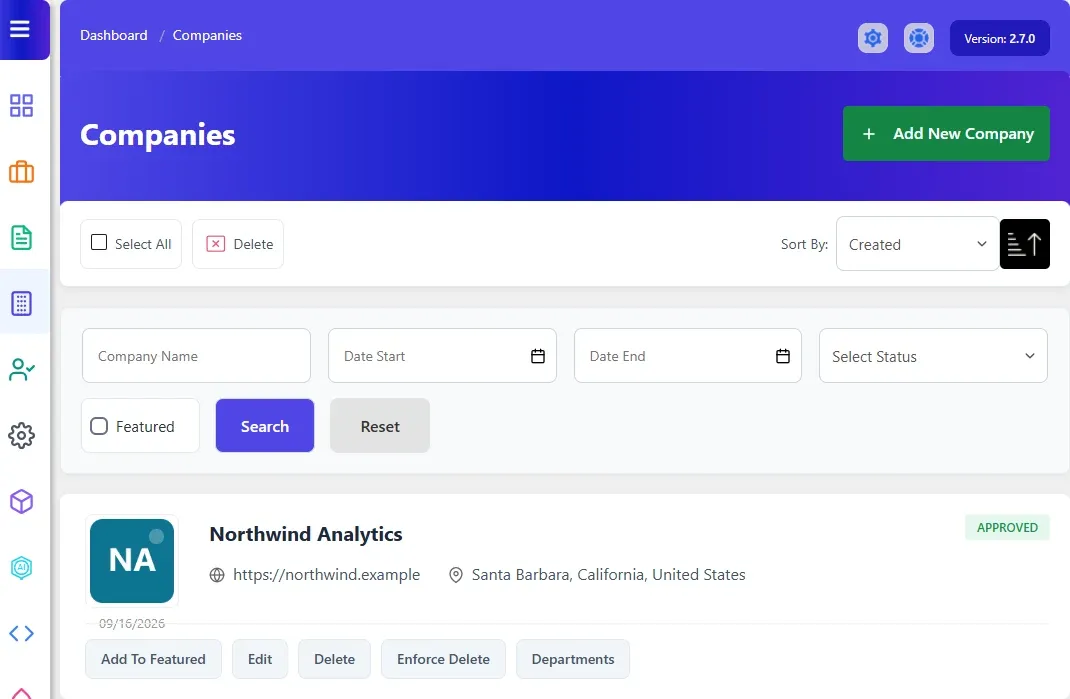
Find a company
Section titled “Find a company”- Type part of the name in Company Name, or set Date Start and Date End to find companies created in that period.
- Optionally pick a status (Approved or Rejected). With Marketplace Suite there is also a Featured checkbox.
- Select Search.
Select Reset to clear the filters. To change the order, pick Company Name, Created or Location next to Sort By and use the arrow beside it to switch direction.
Add a company
Section titled “Add a company”- Go to WP Job Portal → Companies → Add New Company.
- In the user field, choose the employer who owns the company. A window opens where you can search users by Username, Name or Email Address.
- Fill in the rest of the form: name, contact email, website, description, location, logo and so on. Which fields appear and which are required is set in Companies → Fields. See Field manager.
- Choose a Status. New companies you add are Approved unless you pick something else.
- Select Save Company.
The maximum logo size is set by Company Logo Maximum Size in Companies settings.
Edit a company
Section titled “Edit a company”- In the companies list, select the company name or Edit.
- Change what you need, including the Status.
- Select Save Company.
Delete a company
Section titled “Delete a company”Each row has two delete buttons.
| Button | What it does |
|---|---|
| Delete | Deletes the company. It refuses if the company still has jobs, or departments when Pro is active |
| Enforce Delete | Deletes the company together with all its jobs, the applications to those jobs, its departments and its logo, and sends the Delete Company email |
To delete several companies at once, tick them (or Select All) and select Delete at the top. Companies that still have jobs are skipped.
Departments
Section titled “Departments”With Pro, each company row also has a Departments button that lists that company’s departments. See Departments.