

Recruiting insights
Recruiting Insights shows how hiring is going for one company, or one of its jobs: how many people applied, how many were hired and how fast, where candidates came from, and how much work is open on the team.
Open the report
Section titled “Open the report”Site administrators open WP Job Portal → Recruiting Insights. Team members open Recruiting → Recruiting Insights in the employer dashboard and see only the companies and jobs they work on.
- Choose the Company.
- Choose a Job, or All authorized jobs.
- Choose the Application cohort: Last 30 days, Last 90 days, Last 180 days, Last 365 days or All time.
- Select Apply filters.
The report opens on the last 90 days.
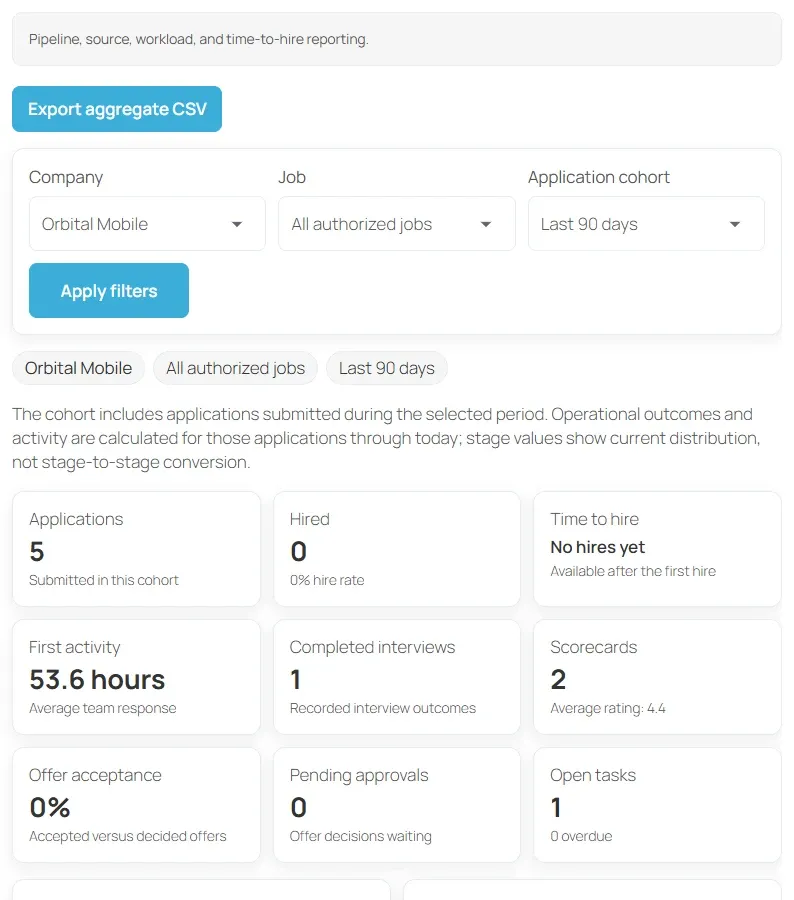
The cohort is the applications submitted in the chosen period. Outcomes and activity are worked out for those applications up to today. Stage figures show where candidates are now, not how many passed through each stage.
Metrics
Section titled “Metrics”| Metric | What it shows |
|---|---|
| Applications | Applications submitted in the cohort |
| Hired | Applications now in the Hired stage, with the hire rate |
| Time to hire | Average days from applying to reaching Hired. Shown after the first hire. |
| First activity | Average hours from applying to the first activity recorded on the application |
| Completed interviews | Interviews marked completed |
| Scorecards | Scorecards submitted, with the average rating |
| Offer acceptance | Accepted offers compared with all decided offers |
| Pending approvals | Offer decisions still waiting for an approver |
| Open tasks | Open team tasks, with how many are overdue |
Sections
Section titled “Sections”- Current Pipeline Distribution: how many candidates sit in each stage now. Unmapped counts applications not yet placed in a stage.
- Interviews and Offers: interviews by status (Scheduled, Completed, Cancelled) and offers by status (Draft, Pending approval, Approved, Sent, Accepted, Declined, Withdrawn).
- Open Task Workload: open and overdue tasks per assignee, including Unassigned. Overdue is worked out in UTC.
- Candidate Sources and Hires: applications and hires per source. Candidate names and contact details aren’t included.
Sources come from the candidate source recorded on each application. See Candidates and pools.
Export to CSV
Section titled “Export to CSV”Select Export aggregate CSV. The file is named after the company and date, and has three columns: Section, Metric and Value. It includes the summary figures, pipeline distribution, task workload per assignee and candidate sources. It contains totals only, no candidate details.