

Trust and safety
Trust & Safety helps you keep fake employers and scam jobs off your board. Employers can ask for their company to be verified, and every new company and job is checked for warning signs. You decide whether those checks only report, or also hold listings back for review.
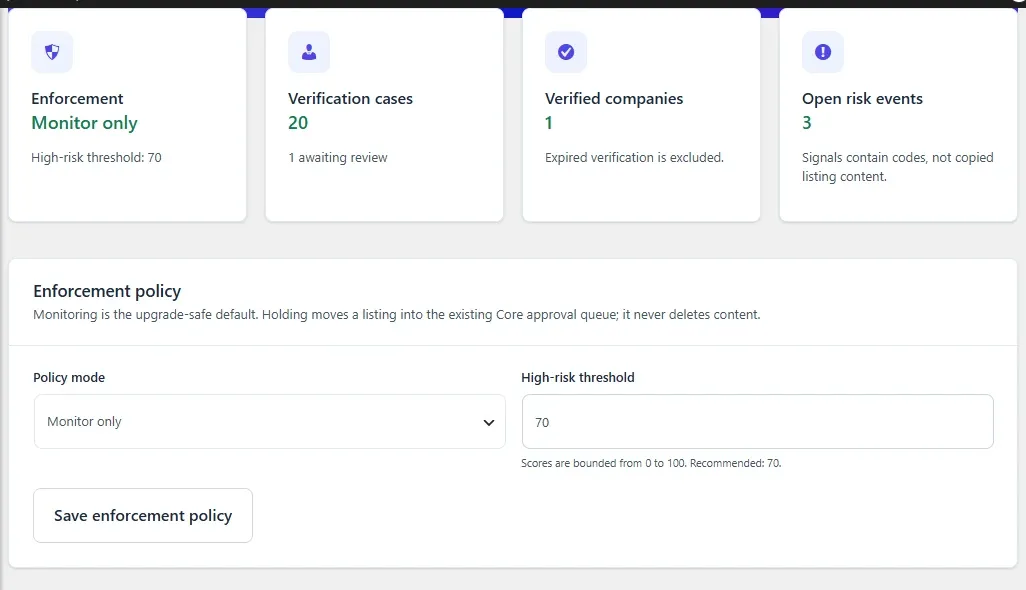
Open WP Job Portal → Marketplace Trust. The screen is titled Trust & Safety. The cards at the top show the enforcement mode, verification cases, verified companies and open risk events.
Choose an enforcement policy
Section titled “Choose an enforcement policy”- In Enforcement policy, choose a Policy mode.
- Set the High-risk threshold, from 40 to 100. The recommended value is 70.
- Select Save enforcement policy.
| Policy mode | What it does |
|---|---|
| Monitor only | Scores companies and jobs and lists risk events. Nothing is held. This is the default. |
| Hold high-risk submissions | Also holds any company or job whose score reaches the threshold. |
| Hold newly saved jobs from unverified companies | Also holds every job saved by a company that is not verified, whatever its score. High-risk companies and jobs are held too. |
Holding sets a company or job back to pending, so it appears in your normal approval queue. Nothing is deleted. Approve it from the job or company approval queue once you are happy with it.
Companies and jobs saved by a site administrator are scored but never held automatically.
What is checked
Section titled “What is checked”Each company or job gets a score from 0 to 100, made up of the signals it trips. The risk event shows the signal names, not a copy of the listing.
| Signal | Points | Checked on |
|---|---|---|
| Website Missing | 15 | Companies, jobs |
| Website Not Https | 10 | Companies, jobs |
| Disposable Email Domain | 70 | Companies, jobs, new employers |
| Free Email Domain | 20 | Companies, jobs, new employers |
| Email Website Domain Mismatch | 25 | Companies, jobs |
| Contact Email Used By Other Owner | 50 | Companies |
| Website Used By Other Owner | 40 | Companies |
| Rapid Company Creation (more than 3 in a day) | 25 | Companies |
| High Risk Marketing Language | 35 | Companies, jobs, new employers |
| Excessive External Links (more than 4) | 20 | Companies, jobs |
| Rapid Job Creation (more than 10 in an hour) | 30 | Jobs |
| Repeated Job Submission (same title more than 4 times in an hour) | 35 | Jobs |
| Company Not Verified | 20 | Jobs |
| Numeric Username Pattern | 20 | New employers |
High Risk Marketing Language looks for phrases such as “guaranteed income”, “easy money”, “wire transfer”, “telegram only” and “whatsapp only”.
New employer accounts are scored and listed, but never held.
Review risk events
Section titled “Review risk events”Open risk events lists every unreviewed event, highest score first.
- Read the Signals and the Enforcement column, which shows whether the listing was held.
- In Review, choose Resolved for a confirmed problem or False positive.
- Optionally add a review note.
- Select Complete review.
Reviewing an event closes it but keeps it on record. It does not approve or reject the listing; do that in the approval queue.
Verify companies
Section titled “Verify companies”Employers ask for verification from their dashboard:
- They open Company Verification under Marketplace.
- They choose an Evidence type: Business registry reference, Company website or domain control, Corporate email reference or Other official reference.
- They enter a Business reference, such as a registry number or company domain.
- They select Submit for verification.
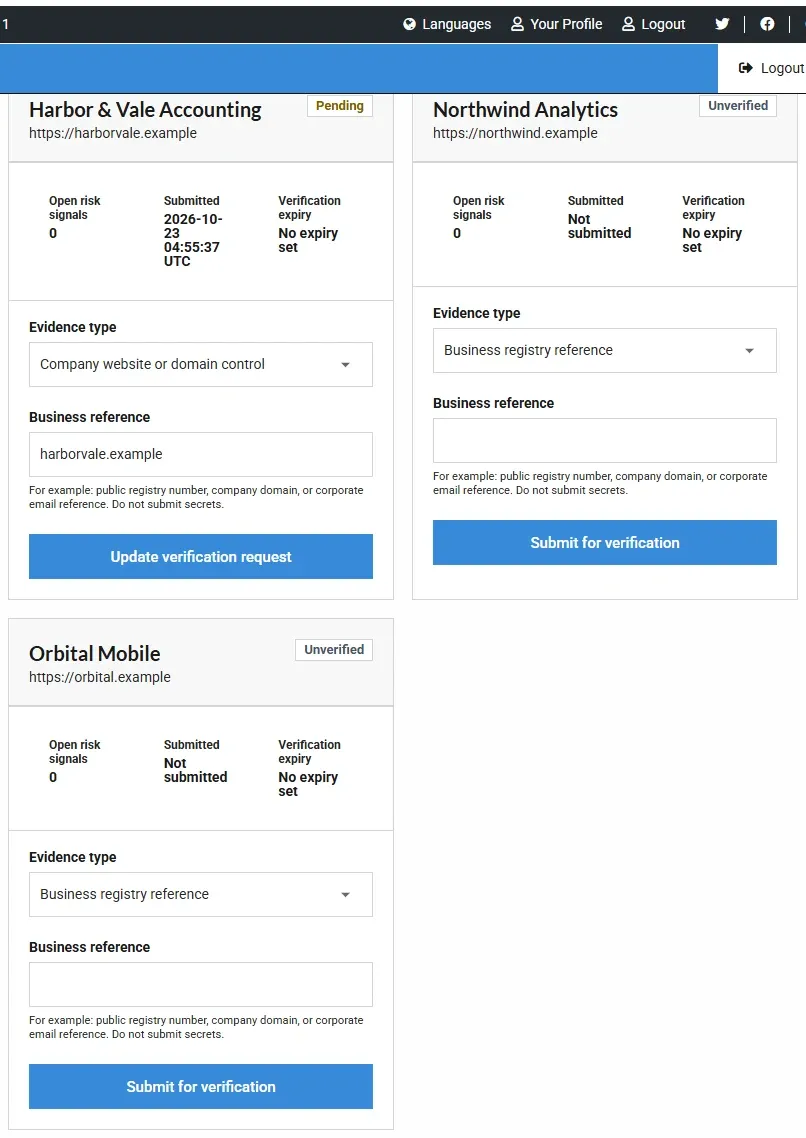
The form tells employers not to enter passwords, payment details or identity documents. Only the company owner, a company admin or a site administrator can submit.
You review requests in Company verification queue on the Trust & Safety screen:
- Check the evidence type and reference.
- Choose Verify, Reject, Suspend or Reset.
- For Reject or Suspend, enter a reason. It is required.
- Optionally set a verification expiry date.
- Select Save review.
| Decision | Effect |
|---|---|
| Verify | Marks the company verified until the expiry date, if you set one. It does not publish anything that was held. |
| Reject | Marks the company rejected and holds all its live jobs. |
| Suspend | Sets the company back to pending and holds all its live jobs. |
| Reset | Returns the company to unverified. |
If a verified company later changes its name, website or contact email, its verification is reset and it needs reviewing again.
Scan current data re-scores a company now. Unless the mode is Monitor only, a scan can hold the company even though you started it.
Privacy
Section titled “Privacy”Risk events store signal codes, not listing text. When a user is deleted or their data is erased through WordPress’s privacy tools, they are unlinked from verification and risk records, and any business reference they submitted is replaced with [redacted].