

Suggested jobs and suggested resumes
Suggestions need no search at all. A job seeker sees jobs picked from their own resume, and an employer sees resumes picked for their own jobs. Each suggestion list is ranked the same way as AI search, so the best matches come first.
Turn suggestions on
Section titled “Turn suggestions on”- Open WP Job Portal → Configurations → Feeds & AI.
- Under AI Suggested Matches, set the options below.
- Save the settings.
| Option | What it does |
|---|---|
| Show AI Suggested Jobs Button | Adds a Suggested Jobs button to each resume on the job seeker’s My Resumes page |
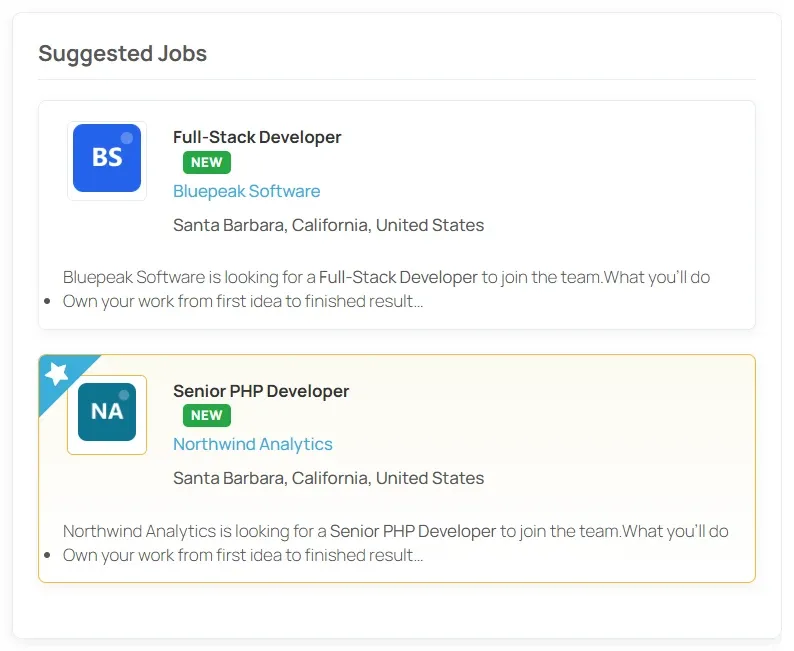
| Show AI Suggested Jobs on Dashboard | Shows a Suggested Jobs list on the job seeker dashboard |
| Show AI Suggested Resumes Button | Adds a Suggested Resumes button to each job on the employer’s My Jobs page |
| Show AI Suggested Resumes on Dashboard | Shows a Suggested Resumes list on the employer dashboard |
Suggestions for job seekers
Section titled “Suggestions for job seekers”Smart Search & Matching builds a short profile from a resume’s title, category and job type, then searches published jobs with it, the same way a search would.
- Suggested Jobs on a resume in My Resumes opens the job list showing every job suggested for that resume, ranked and paged.
- The Suggested Jobs section on the job seeker dashboard shows up to five jobs, taken from all of the job seeker’s resumes, newest resume first.
A resume with a clear title, category and job type gets better suggestions. Words that mean the same thing are included, so a resume titled “Programmer” is also matched with “Developer” jobs.
Suggestions for employers
Section titled “Suggestions for employers”The same works the other way round. Smart Search & Matching builds a profile from a job’s title, category and job type and searches approved resumes with it. Quick-apply resumes aren’t suggested.
- Suggested Resumes on a job in My Jobs opens the resume list showing every resume suggested for that job.
- The Suggested Resumes section on the employer dashboard shows up to five resumes, taken from all of the employer’s jobs, newest job first.
How fresh suggestions are
Section titled “How fresh suggestions are”Each visitor’s suggestion list is kept for an hour. A job or resume added within that hour may not appear in the dashboard section until the hour is up.
Suggestions only appear for signed-in job seekers and employers.