

Reports
The reports give you an overview of activity on your job board: how many jobs, resumes, companies and applications there are, how they split by category, city and job type, and how the last month went. The Overall Reports screen is in the free plugin. Pro adds employer and job seeker reports, and My Stats pages for your users.
Overall reports
Section titled “Overall reports”Open WP Job Portal → Reports → Overall Reports.
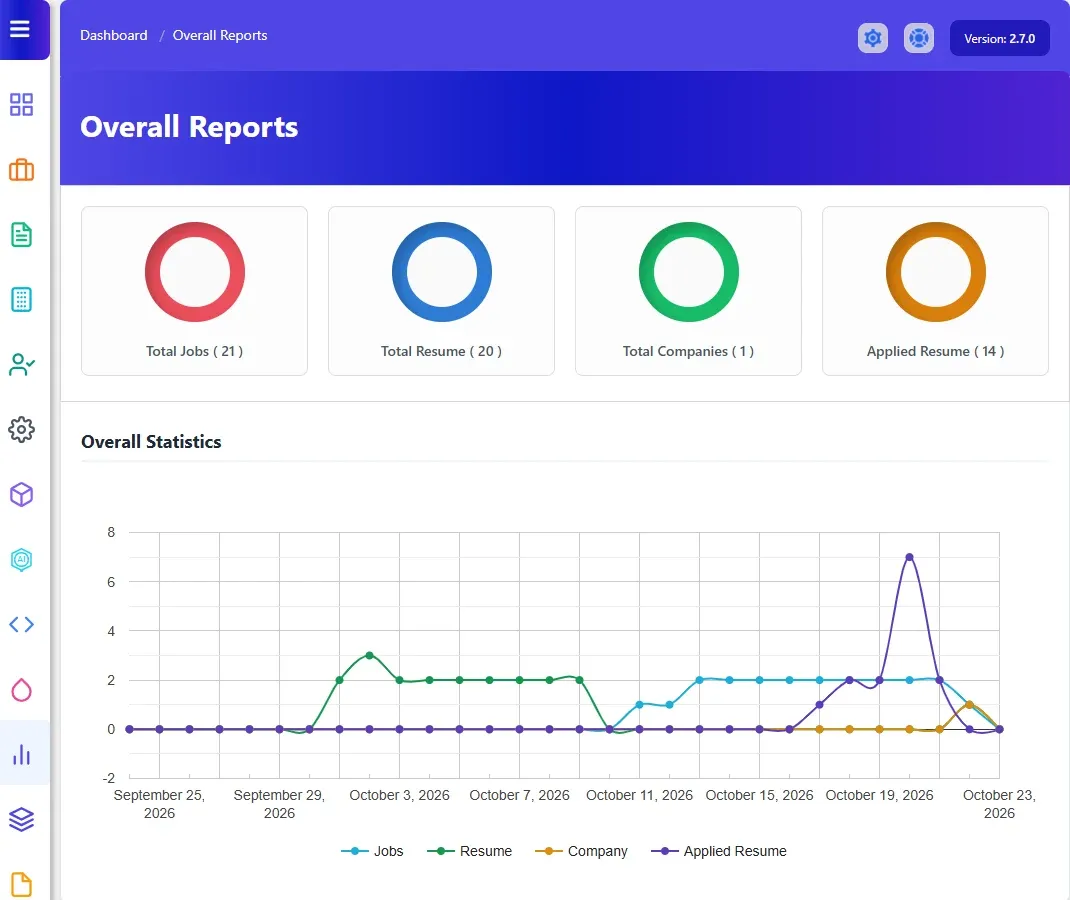
The top of the screen shows four totals: Total Jobs, Total Resume, Total Companies and Applied Resume. They count what was added in the last month, the same period as the Overall Statistics chart, not everything on the site. Below them are these charts:
| Chart | What it shows |
|---|---|
| Overall Statistics | Jobs, resumes, companies and applications per day over the last month. |
| Report By Job Categories | Jobs per category. |
| Report By Resume Categories | Resumes per category. |
| Report By Job Cities | Jobs per city. |
| Report By Company Cities | Companies per city. |
| Report By Resume Cities | Resumes per city. |
| Report By Job Types | Jobs per job type. |
| Report By Resume Types | Resumes per job type. |
Employer reports
Section titled “Employer reports”With Pro, open WP Job Portal → Reports → Employer Reports.
It shows Active Jobs and Applied Jobs, plus Featured Jobs when Marketplace Suite featured jobs are in use. Then come these charts:
- Overall Statistics: jobs, featured jobs and applications per day over the last month.
- Jobs By Categories
- Jobs By Cities
- Jobs By Types
- Jobs By Companies
Without Pro, the Reports menu shows Employer / Job Seeker Report with a button to get it.
Job seeker reports
Section titled “Job seeker reports”With Pro, open WP Job Portal → Reports → Job Seeker Reports.
It shows Active Resume and Applied Jobs, plus Featured Resume when Marketplace Suite featured resumes are in use. Then come these charts:
- Overall Statistics
- Resume By Categories
- Resume By Cities
- Resume By Job Types
- Resume By Job Salaries
My Stats for employers and job seekers
Section titled “My Stats for employers and job seekers”Pro also gives employers and job seekers a My Stats page on the front end, linked from their dashboards. It summarises their own activity. See My stats in the employer guide.