

Packages and subscriptions
A package is a bundle of allowances, such as five jobs, two featured jobs and one company, that lasts for a set time. Users buy packages when the Submission Type is Membership. A package can also be sold as a subscription that renews automatically.
Create a package
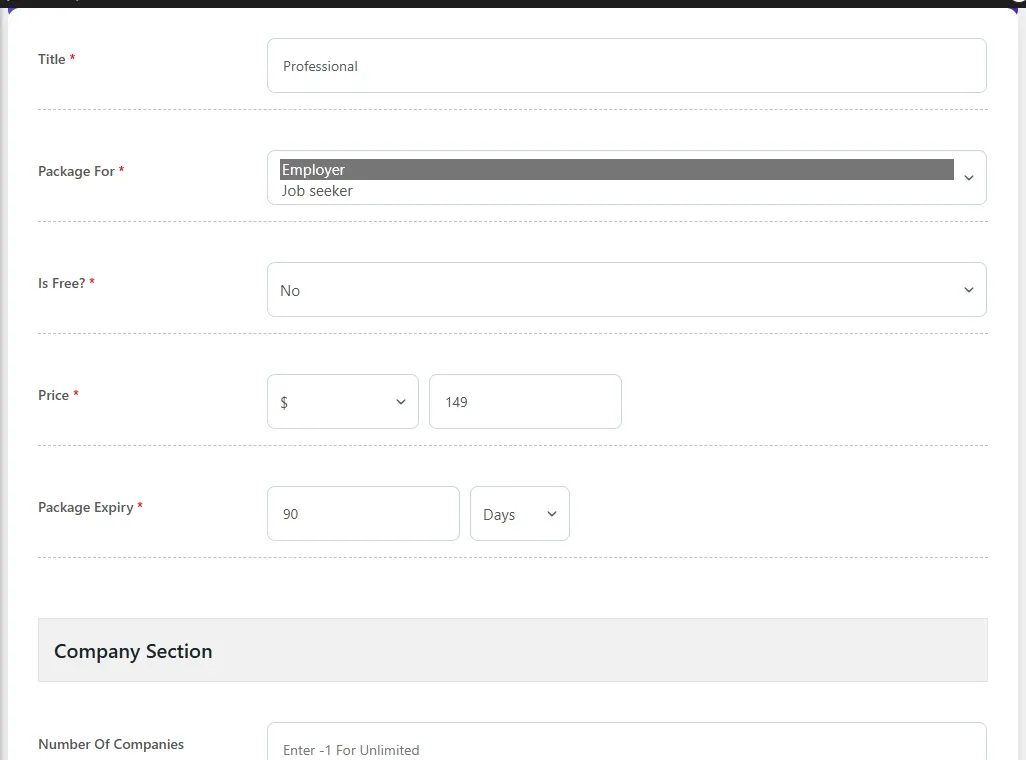
Section titled “Create a package”- Open WP Job Portal → Packages → Add New Package.
- Enter a Title.
- In Package For, choose who can buy it: employers, job seekers or both.
- Set Is Free to No and enter a Price and Currency. For a free package, set Is Free to Yes.
- Set Package Expiry to how long the package lasts after purchase, in days, weeks, months or years.
- Fill in the allowances in each section. Enter
-1for unlimited. - Optionally set a Discount and a Renewal Discount, as an Amount or a %.
- Set Published to Yes.
- Select Save Package.
A message at the top of the packages screen reminds you that these are the only packages on the site. If you sell through WooCommerce, you map products to these packages rather than creating new ones.
Package allowances
Section titled “Package allowances”| Section | Options |
|---|---|
| Company Section | Number Of Companies, Number Of Featured Companies, Featured Company Expiry, Number Of Company Contact Detail Views |
| Job Section | Number Of Jobs, Job Expiry, Number Of Featured Jobs, Featured Job Expiry, Number Of Job Searches, Number Of Job Alerts, Number Of Job Apply |
| Resume Section | Number Of Resumes, Number Of Featured Resumes, Featured Resume Expiry, Allow Resume Search, Number Of Resume Save Search, Number Of Resume Contact Detail Views |
| Department Section | Number Of Departments |
| Cover Letter Section | Number Of Cover Letters |
Job Expiry is how long each job posted with the package stays live. The three featured expiry fields set how long a featured period lasts.
Free packages
Section titled “Free packages”Free packages are claimed with one click and never go through a payment gateway. Three options in Packages & Featured Listings on the Monetization tab control them:
| Option | What it does |
|---|---|
| Auto-assign Free Package to New User | In Membership mode, gives each new user a free package for their role, if one exists. |
| Free Package Purchase Auto Approve | Activates a claimed free package straight away. Otherwise it waits for you to approve it. |
| Purchase Free Package Only Once | Stops a user claiming the same free package twice. |
Give a package to a user
Section titled “Give a package to a user”- Open WP Job Portal → Packages → Add New User Package.
- Choose the user and the package.
- Set the status to Approve to activate it now, or Pending.
- Select Save Package.
This assigns the package without a payment, so no invoice is created. User Packages lists every package users hold. Revoke removes a user’s access to a package.
Renewing a package
Section titled “Renewing a package”When a user’s package has expired, they can buy it again as a renewal. The Renewal Discount applies to that purchase, and the old package is closed.
Subscriptions
Section titled “Subscriptions”A subscription renews the package automatically each billing period and grants it again after every successful payment. How you set one up depends on the gateway:
- Stripe: set Stripe Subscription to Yes on the package and choose the Stripe plan. See Stripe.
- PayPal: set Paypal Subscription to Yes. PayPal’s billing plan is created from the package price and Package Expiry the first time someone subscribes. See PayPal.
- WooCommerce: create a WooCommerce Subscriptions product mapped to the package. See WooCommerce.
The Stripe Subscription and Paypal Subscription fields only appear when that gateway is enabled.
When a package offers a subscription, the buyer sees Make payment recurring next to that gateway. Users see their subscriptions under My Subscriptions, with the billing cycle and next billing date. Stripe and PayPal subscriptions show Cancel. WooCommerce subscriptions show Managed in WooCommerce.
Delete or unpublish a package
Section titled “Delete or unpublish a package”Unpublishing hides a package from sale. Users who already hold it keep it. A package that anyone has bought cannot be deleted.
Shortcodes
Section titled “Shortcodes”| Shortcode | Shows |
|---|---|
[wpjobportal_allpackages] |
The packages the current user can buy |
[wpjobportal_mypackages] |
The user’s packages and their remaining balances |
[wpjobportal_mysubscription] |
The user’s subscriptions |
[wpjobportal_myinvoices] |
The user’s invoices |