

Revenue overview
Marketplace Reports shows what your package sales have earned and how many orders were paid, along with subscriptions and scheduled promotions. The money figures are read from WooCommerce orders, so they are most useful when you sell packages through WooCommerce.
Open WP Job Portal → Marketplace Reports.
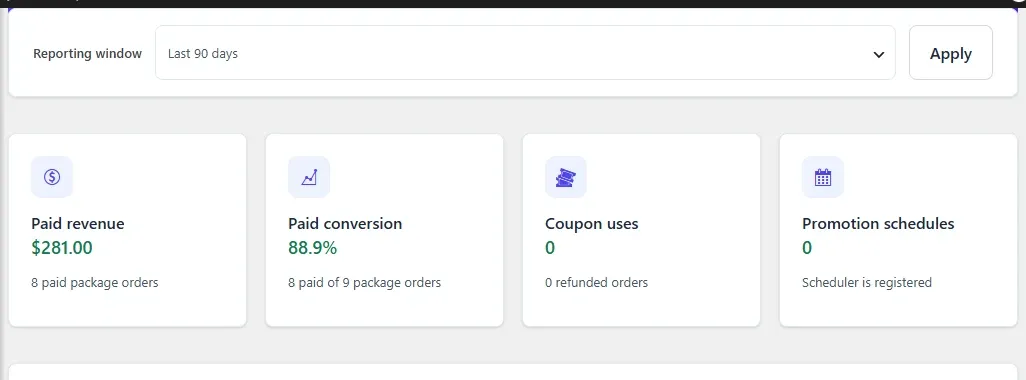
Choose a reporting window
Section titled “Choose a reporting window”- In Reporting window, choose Last 30 days, Last 90 days or Last 365 days.
- Select Apply.
The cards and the order list cover the most recent 500 WooCommerce orders in that window. If there are more, a notice says the view is limited.
The figures
Section titled “The figures”| Card | What it shows |
|---|---|
| Paid revenue | The total of package orders that are Processing or Completed, one total per currency, and how many orders that is. |
| Paid conversion | The share of package orders that were paid, out of all package orders in the window. |
| Coupon uses | How many coupons were used on package orders, and how many package orders were refunded. |
| Promotion schedules | How many featured-job promotions are scheduled or running, and whether the scheduler is registered. |
An order counts as a package order when at least one of its products is mapped to a WP Job Portal package. Other shop orders are left out.
Package orders
Section titled “Package orders”WooCommerce package orders lists up to 100 recent package orders, with the order number, date, packages, status and total. If you can manage WooCommerce, Open order takes you to the order.
Subscriptions
Section titled “Subscriptions”WooCommerce subscriptions lists subscriptions for mapped products, with their packages, status, billing schedule and next payment date. This needs the WooCommerce Subscriptions plugin. Without it, the table is empty.
Promotion schedules
Section titled “Promotion schedules”Featured-job schedules lists every scheduled featured period, newest first, with the company, job, window in UTC and status. Use it to check promotions that failed or are waiting.
If the Promotion schedules card says Scheduler needs attention, the five-minute scheduled task that starts and ends promotions is not registered. Check that WP-Cron is running on your site. See Cron jobs.
Stripe and PayPal sales
Section titled “Stripe and PayPal sales”Purchases paid directly through Stripe or PayPal are not WooCommerce orders, so they don’t appear in these figures. You can find them in WP Job Portal → Packages → Invoices, which lists every paid purchase whatever the gateway. See Checkout, orders and invoices.
The overview screen
Section titled “The overview screen”WP Job Portal → Marketplace Suite gives a quick status view:
| Card | What it shows |
|---|---|
| Package authority | That your WP Job Portal packages are the only package catalogue |
| WooCommerce mappings | How many WooCommerce products are mapped to packages |
| Verification | How many verification requests are waiting, with a link to review them |
| Promotion schedules | How many promotions are scheduled or running, with a link to the reports |