

How credits work
In Marketplace Suite, “credits” means the uses left on a user’s packages. There is no separate points balance to top up. A package that allows ten jobs gives the user ten job credits, and each job they post uses one.
Credits only apply when the Submission Type is Membership. In Per Listing mode each action is paid for on its own, and in Free mode nothing is counted.
How a use is counted
Section titled “How a use is counted”Each package records its allowances, such as Number Of Jobs or Number Of Featured Jobs. Every time the user does one of those actions, Marketplace Suite records one use against the package. The remaining balance is the allowance minus the uses recorded.
| Allowance value | Meaning |
|---|---|
| A number | That many uses, until the package expires |
-1 |
Unlimited |
0 |
Not included in the package |
A package can only be used while it is active and has not passed its expiry date. Uses left on an expired package are not carried over, but the user can renew the package.
If a user holds more than one package with room for the action, they choose which package to draw from.
What uses a credit
Section titled “What uses a credit”Each of these actions draws one use from the matching allowance:
- Adding a company, department, cover letter, resume or job alert
- Posting a job
- Featuring a job, company or resume
- Applying for a job
- Viewing a resume’s or a company’s contact details
- Saving a resume search
Allow Resume Search is a yes-or-no switch rather than a count.
Where users see their balance
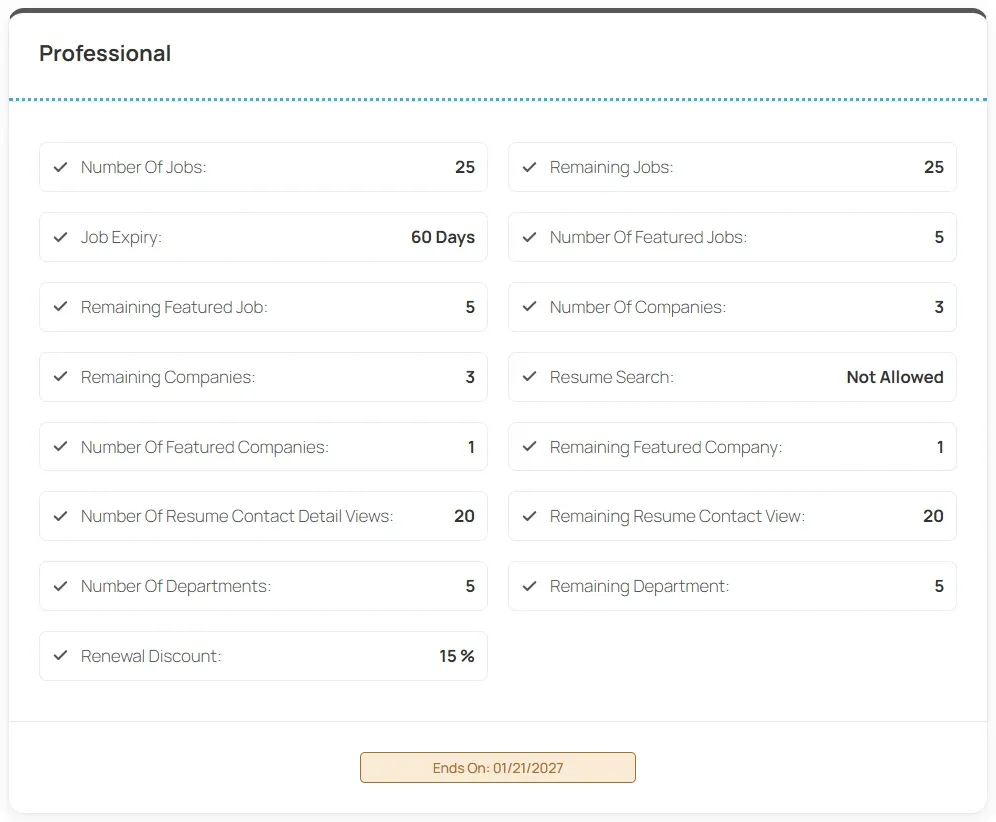
Section titled “Where users see their balance”Users see their packages under My Packages in their dashboard. Each package shows its allowances next to the remaining balance, for example Number Of Jobs and Remaining Jobs, along with the Ends On date. Expired packages show Renew This Package.
Turn the My Packages link on or off in Dashboard Monetization Links on the Monetization tab.
When a use is given back
Section titled “When a use is given back”A recorded use is released, and the balance goes back up, when:
- an employer cancels a scheduled promotion before it starts
- a scheduled promotion fails to start
- the job or company behind a scheduled promotion is deleted before it starts
When you revoke a user’s package in User Packages, the package and its recorded uses are closed together.
Refunds through WooCommerce
Section titled “Refunds through WooCommerce”When a WooCommerce order for a package is refunded, cancelled or fails, unused packages from that order are revoked. A package that has already been used is kept, and the order gets a note asking you to review it. See WooCommerce.